AI
❓ How it works
Section titled “❓ How it works”This brick is heavily opinionated. It combines:
- Langfuse for prompts management (storage, versioning, combining, etc.) and trace management
- Vercel AI SDK for the LLM calls
- A custom AI Module in the API, which provides a service to generate text, objects and chat with LLMs.
Prompt management - Langfuse
Section titled “Prompt management - Langfuse”Langfuse can be self hosted, and is entirely open source. See their docs for more advanced usage.
Langfuse allows us to create, version and fetch prompts.
We found it was a better solution than storing the prompts in the codebase, as it allows the whole team to contribute to the prompts (including non developers) and to change a prompt without deploying the codebase.
LLM calls - Vercel AI SDK
Section titled “LLM calls - Vercel AI SDK”The Vercel AI SDK allows us to easily call LLMs accross providers and is natively OpenTelemetry compatible via the experimental_telemetry option.
Tracing Architecture - OpenTelemetry
Section titled “Tracing Architecture - OpenTelemetry”The Vercel AI SDK is OpenTelemetry compatible and automatically emits spans for all LLM calls. Both Sentry and Langfuse simply pick up these spans through the shared TracerProvider, no additional instrumentation is required.
The tracing system is initialized in apps/api/src/instrument.ts before the NestJS application starts. The shared TracerProvider uses:
- LangfuseSpanProcessor: Filters and exports only LLM-related spans (instrumentation scope:
langfuse-sdkorai) to Langfuse - SentrySpanProcessor: Receives all spans for application monitoring in Sentry
📝 How to use
Section titled “📝 How to use”- Create the Langfuse project in your Langfuse dashboard
- Setup the necessary env variables (
LANGFUSE_SECRET_KEY, optionallyLANGFUSE_PUBLIC_KEYandLANGFUSE_BASE_URL, plus at least one provider key likeOPENAI_API_KEY) in theapi/.envfile. - You are good to go!
Organizing Traces
Section titled “Organizing Traces”By default, all LLM calls are grouped into the same OTEL trace. An OTEL trace starts on a HTTP requests or a CRON job. All children spans are grouped into this trace.
But that may not be convenient for your use case. Imagine a CRON job that loops on a hugh list of items: you may want to have 1 line per item in Langfuse UI, not a giant trace with hundreds of lines.
On Sentry’s side, there’s not much we can do. But with Langfuse however, we have more control on span/trace grouping and naming.
You can organize AI calls into meaningful traces using the telemetry option:
traceMode: Controls grouping behavior.inheritreuses the current OTEL trace context (default).splitcreates a dedicated Langfuse trace for this call by injecting a specifictraceId.- For
chat, when telemetry is provided andtraceModeis omitted, the default issplit.
traceId: Optional explicit trace ID in split mode. Reuse it if you want several calls to belong to the same split trace. This is applied throughparentSpanContextin Langfuse tracing (not through Vercel telemetry fields).traceName: Display name for the Langfuse trace. This is only for readability in the UI.spanName: Span name for the current LLM call. Internally, this is forwarded to Vercel telemetry asfunctionId.sessionId: Groups multiple traces into a Langfuse Session (best for chat or long workflows split into many traces).metadata: Trace/span metadata for filtering and analysis (job IDs, user IDs, step IDs, etc.).langfuseOriginalPrompt: Preserves the original prompt before enhancements (useful for debugging).
Recommended use-cases
Section titled “Recommended use-cases”1) Single-shot generation
Section titled “1) Single-shot generation”Use inherit with a clear traceName + spanName:
await aiService.generateText({  prompt: 'Summarize this article',  options: {    telemetry: {      traceMode: 'inherit',      traceName: 'api.single-generation',      spanName: 'ai.generate-text',    },  },})
// Add more context to the trace, displayed in the row of the trace in Langfuse UIthis.langfuseService.finalizeTrace({  input: body.prompt,  output: result.result,})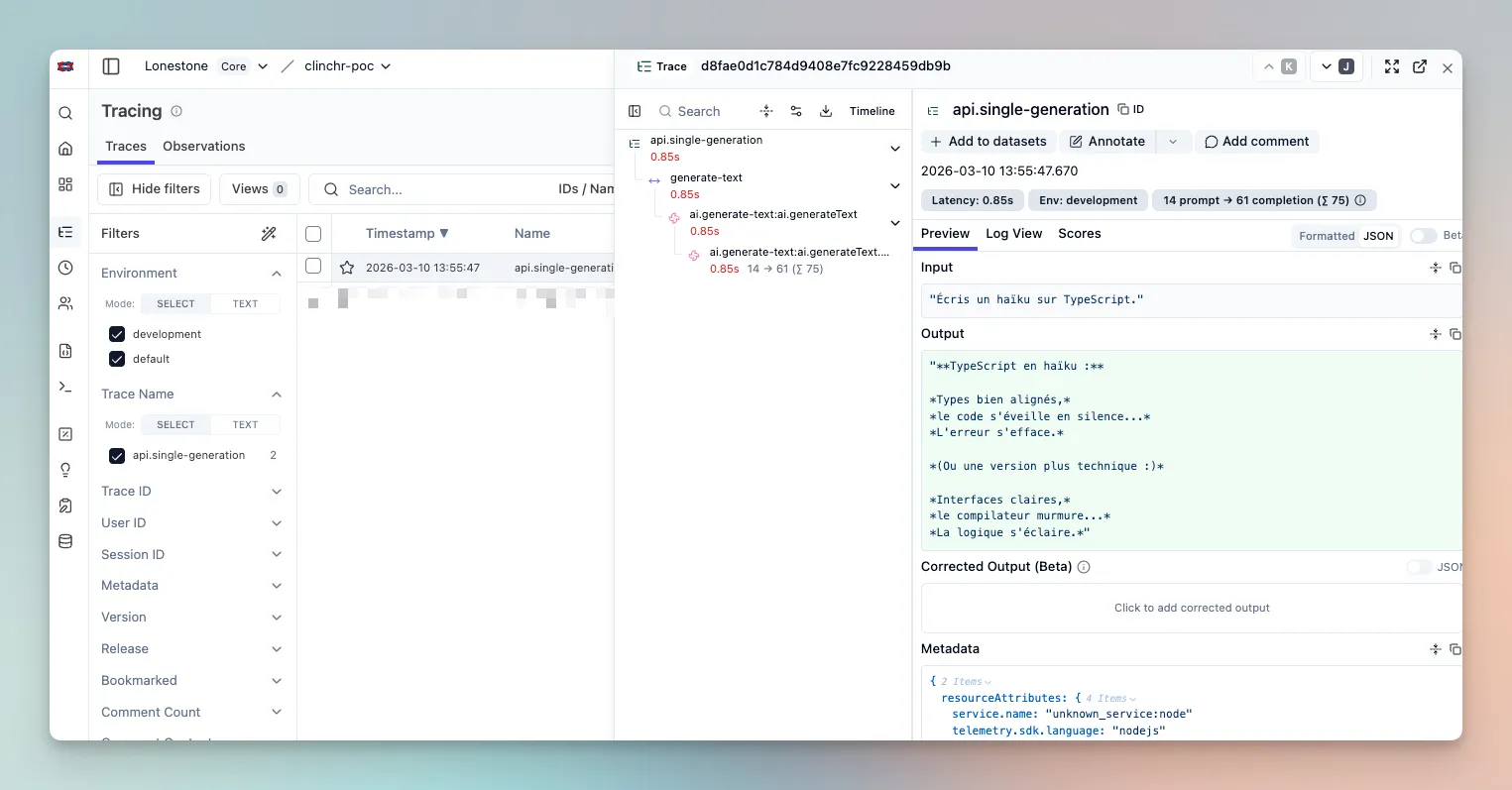
2) One API request, 3 LLM calls grouped
Section titled “2) One API request, 3 LLM calls grouped”In this case, we can keep the same OTEL trace (as we want all the LLM calls to be grouped anyway), and finish with finalizeTrace() to add more context to the trace, displayed in the row of the trace in Langfuse UI:
const results: string[] = []
const step1 = await aiService.generateText({  prompt: 'Step 1',  options: { telemetry: { traceMode: 'inherit', spanName: 'ai.step-1' } },})results.push(step1.result)
const step2 = await aiService.generateObject({  prompt: 'Step 2',  schema,  options: { telemetry: { traceMode: 'inherit', spanName: 'ai.step-2' } },})results.push(step2.result)
const step3 = await aiService.generateText({  prompt: 'Step 3',  options: { telemetry: { traceMode: 'inherit', spanName: 'ai.step-3' } },})results.push(step3.result)
// Customize the input and output to display the relevant information in the row of the trace in Langfuse UI// Beware that Langfuse UI input and output display is quite arbitrary, so I advice you build a nice stringlangfuseService.finalizeTrace({  name: `api.grouped-calls-${Date.now()}`,  input: { prompts: ['Step 1', 'Step 2', 'Step 3'] },  output: { results, status: 'done' },})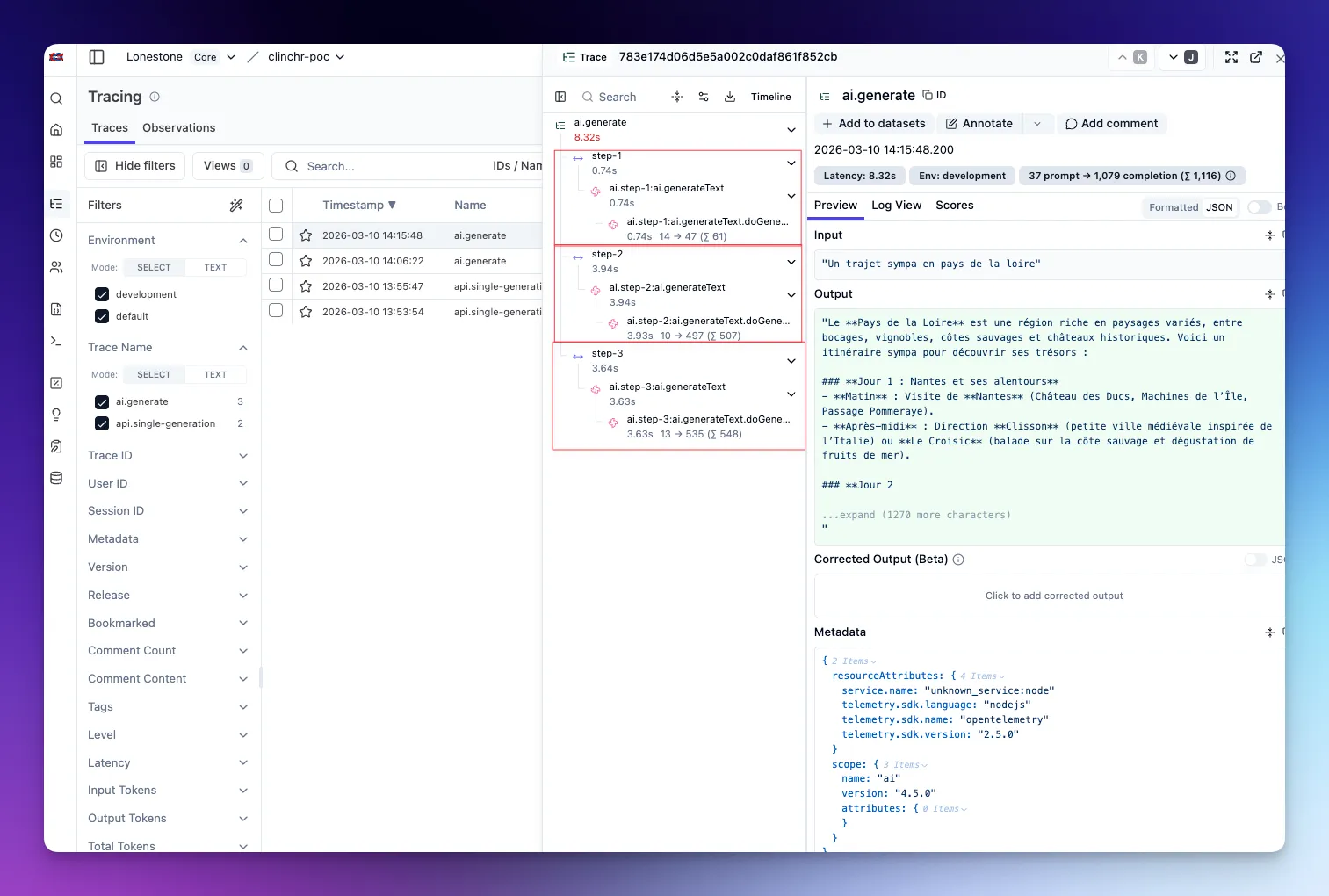
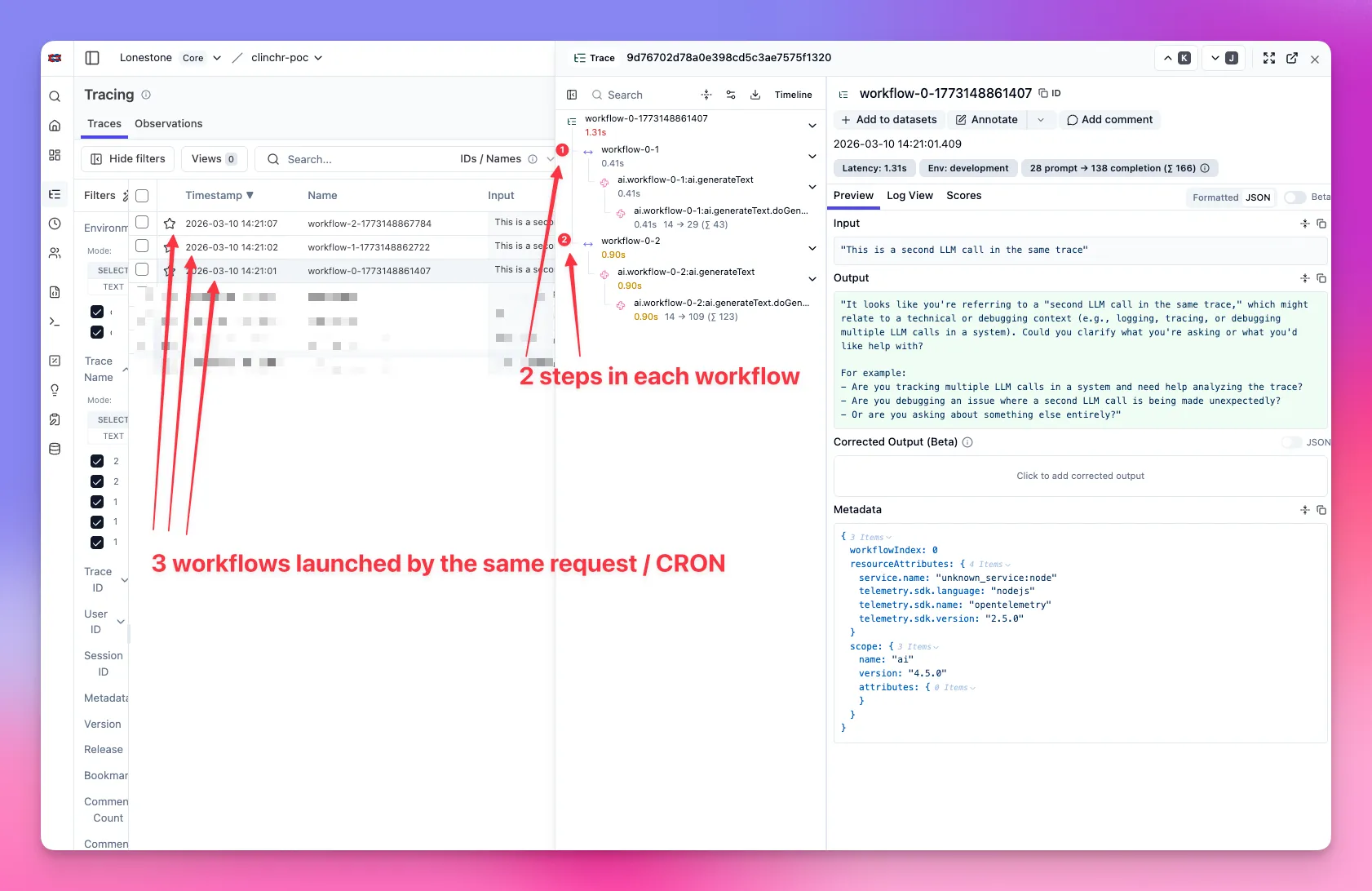
3) Long-running job with 100 split sub-jobs
Section titled “3) Long-running job with 100 split sub-jobs”For one trace per sub-job (100 lines in trace list), use split mode and a unique traceId per sub-job:
await aiService.generateText({ prompt: subJobPrompt, options: { telemetry: { traceMode: 'split', traceId: await LangfuseService.createTraceId(`job:${jobId}:subjob:${subJobId}`), traceName: `job:${jobId}:subjob:${subJobId}`, spanName: 'ai.subjob.generate', metadata: { jobId, subJobId }, }, },})Advanced case (1 sub-job = several LLM calls): compute one traceId per sub-job and reuse it across all calls of that sub-job.
4) Chat
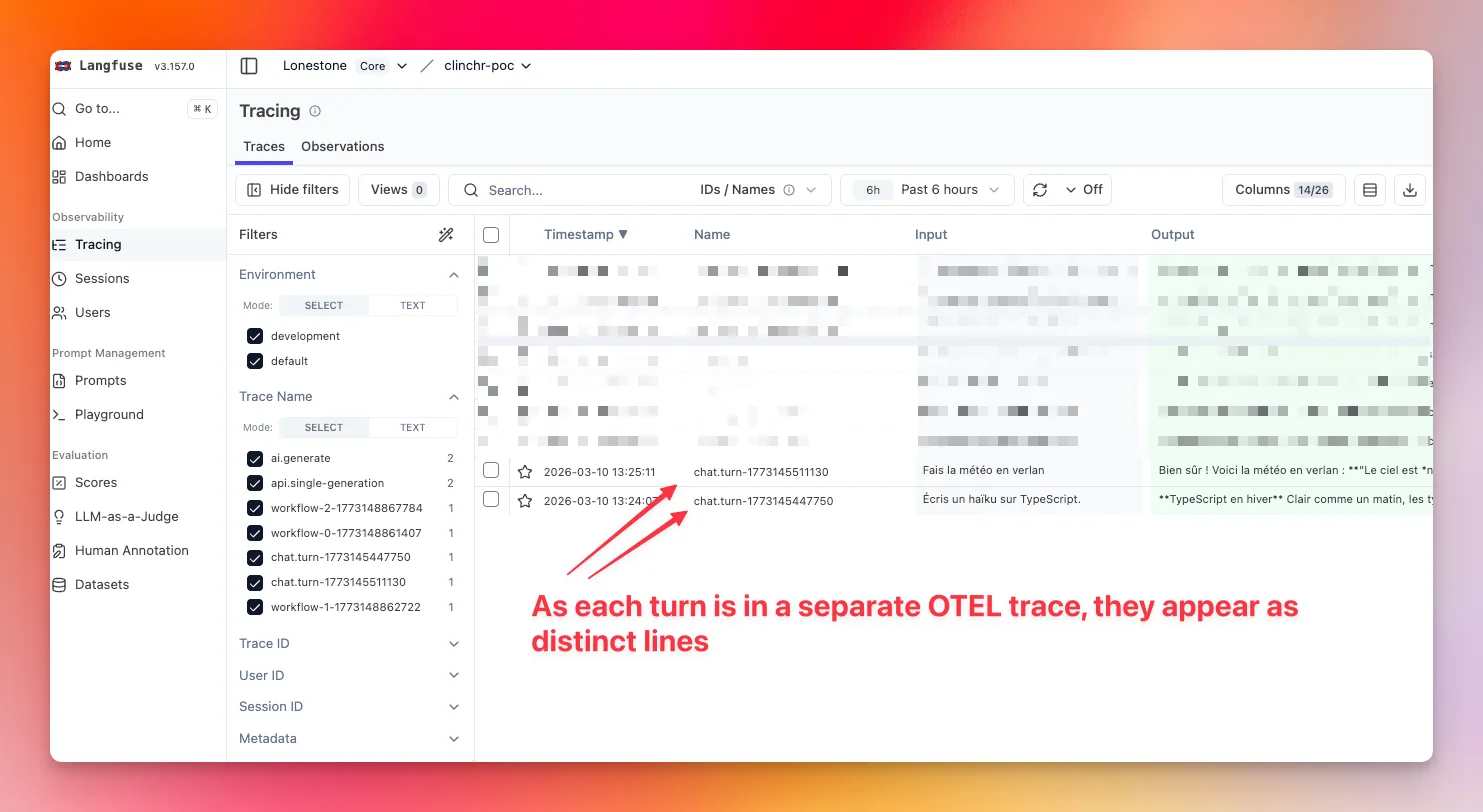
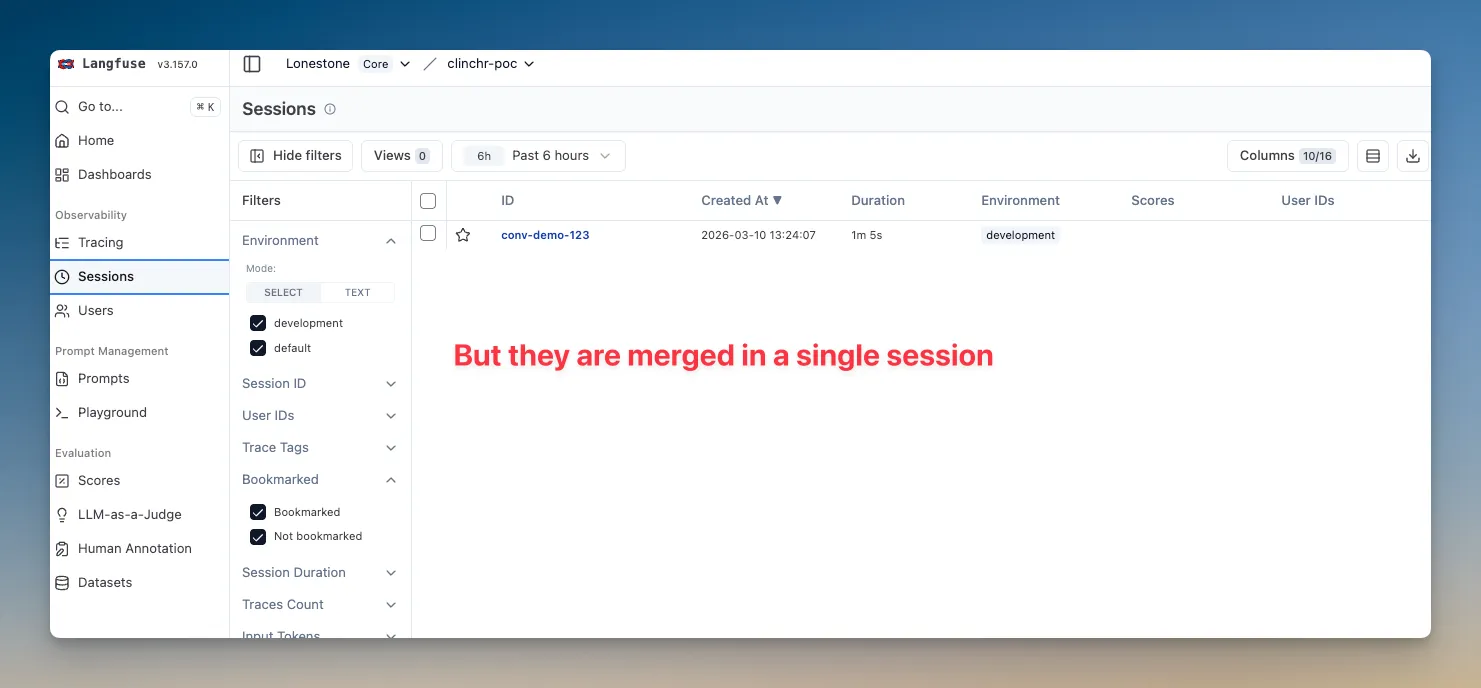
Section titled “4) Chat”Use split per turn and reuse sessionId (conversation/thread ID):
await aiService.chat({ messages, options: { telemetry: { traceMode: 'split', traceId: await LangfuseService.createTraceId(`chat:${conversationId}:turn:${turnId}`), traceName: `chat.turn:${turnId}`, spanName: 'ai.chat.turn', sessionId: conversationId, metadata: { conversationId, turnId }, }, },})With this, each turn will be displayed as a separate line in Langfuse UI, and all the turns for the same conversation will be merged into a single session.
Going further
Section titled “Going further”Nothing stops you from using those different parameters in a more complex way.
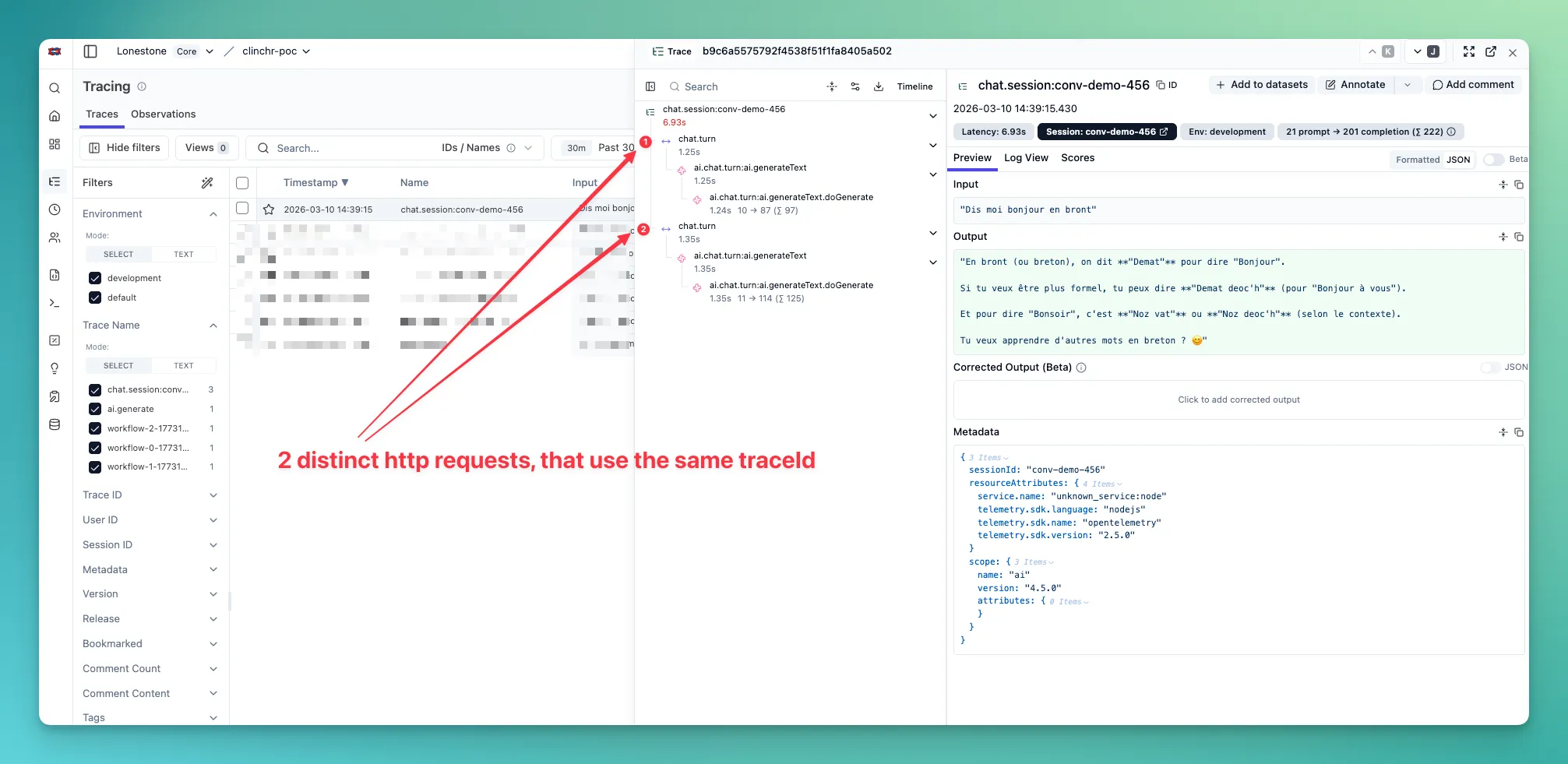
For example, you may want to update the Langfuse trace for each new turn of a chat, instead of creating a new trace for each turn.
You can do this by using traceMode: 'split' and the same traceId for all the turns of the same conversation.
You may also want to use the session feature to group traces across requests for something else than a chat (e.g. a long-running job that loops on a huge list of items).
Trace use-case examples
Section titled “Trace use-case examples”The API exposes five example endpoints that demonstrate each trace pattern. Call them under POST /ai/examples/use-case-* (see OpenAPI for request bodies):
| Use case | Endpoint | Description |
|---|---|---|
| 1. Single generation | POST /ai/examples/use-case-1-single-generation | One REST call, one LLM call; trace is finalized with name/output so Langfuse shows them. |
| 2. Grouped calls | POST /ai/examples/use-case-2-grouped-calls | One REST call, several LLM calls in one trace (inherit); finalizeTrace at end. |
| 3. Logical units | POST /ai/examples/use-case-3-logical-units | One REST call, each “workflow” gets its own trace (split per unit). |
| 4. Chat session | POST /ai/examples/use-case-4-chat-session | Chat with explicit sessionId to group traces across requests. |
| 5. Chat session with turns merged into a single trace | POST /ai/examples/use-case-5-chat-session-with-turns-merged | Chat with explicit sessionId to group traces across requests, and turns merged into a single trace. |
API Reference
Section titled “API Reference”See the AI module README for detailed API documentation and usage patterns.
🧹 How to remove
Section titled “🧹 How to remove”- Delete the
aimodule from theapi/src/modulesfolder. - Remove Langfuse + AI SDK dependencies from
apps/api/package.json:
"@ai-sdk/anthropic","@ai-sdk/google","@ai-sdk/mcp","@ai-sdk/mistral","@ai-sdk/openai","@langfuse/client","@langfuse/otel","@langfuse/tracing","ai",- Remove Langfuse/provider env variables from
apps/api/.env:
LANGFUSE_SECRET_KEY=LANGFUSE_PUBLIC_KEY=LANGFUSE_BASE_URL=OPENAI_API_KEY=GOOGLE_API_KEY=MISTRAL_API_KEY=ANTHROPIC_API_KEY=